About the directory & our standards

Cameras & sensors / Kit / assembly

Snake and a live light meter on a pocket screen

Touchscreen Snake with a live light-level bar and physical LED feedback.

Read the original build See shopping list
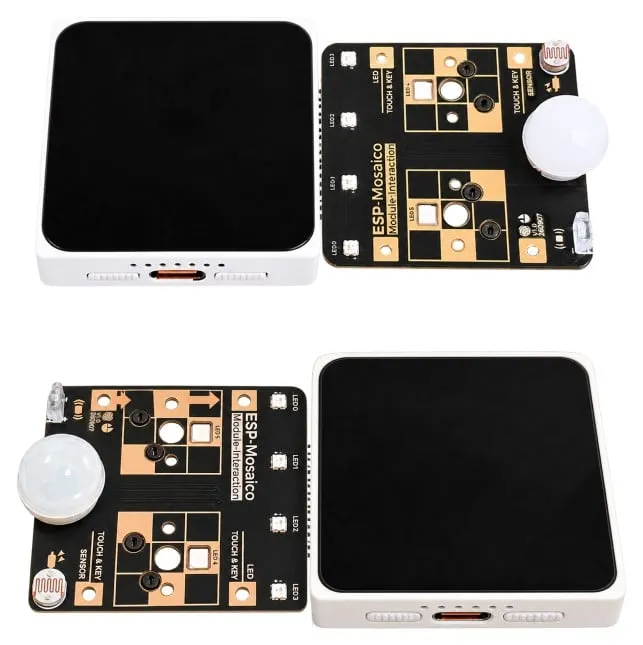
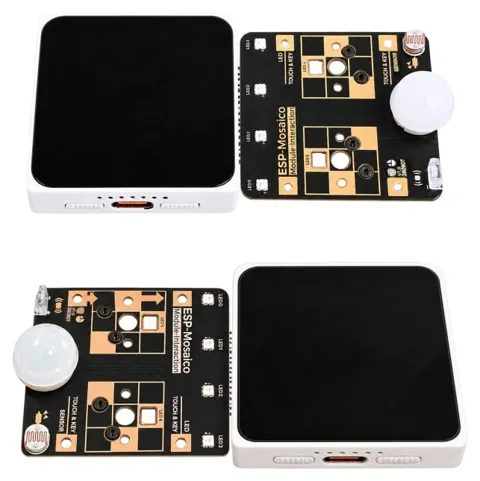
The Interaction module connected to the CoreBoard's right slot (top) and left slot (bottom)
The Embedded Rustacean · ESP-Mosaico hardware

What the hardware does

Touch input, a physical light sensor and LEDs drive a game and live light meter.

How the agent helped

Omar Hiari documents prompts, generated C, simulator tests, flashing and the working hardware. Distinguishes failed on-device chat from successful laptop coding agent.

Before you build

A modular development device rather than a finished appliance. Requires USB flashing and a toolchain; review unit supplied by Espressif.

Follow the build

blog.theembeddedrustacean.com

Original build story

First-person build walkthrough

github.com
Supporting source

Shopping list

Save as Markdown

Parts for one build. Reuse equipment you already own. Quantities are planning quantities unless the creator explicitly specifies a count; kit contents are not additional purchases.

Confirm before buying

  • The review unit’s exact CoreBoard/module revision and a retail bundle containing both parts have not been confirmed. Hardware guides are references, not buy links.

Quantities are for one build. Unless marked source-specified, they are planning quantities; confirm kit contents and the chosen configuration before ordering.

  1. Qty. 1Plan / confirm
    Required

    ESP-Mosaico CoreBoard

    Display and processor.

    Manufacturer documents V1.0 and V1.2 separately; match your board silkscreen to its guide.

    Sources & quantity basis

    Creator source. Planning quantity for one build; check the selected configuration.

    Hardware reference

    Hardware reference, not a purchase link

  2. Qty. 1Plan / confirm
    Required

    ESP-Mosaico Multi-function Interaction module

    Adds sensing used by the light-meter build.

    Not the camera expansion. Match both the module and mainboard revisions.

    Sources & quantity basis

    Creator source. Planning quantity for one build; check the selected configuration.

    Hardware reference

    Hardware reference, not a purchase link

  3. Qty. 1Plan / confirm
    Required

    USB-C data cable

    Connect to the computer for programming or data.

    A charge-only cable cannot flash firmware. Example requires a USB-A host port. If your computer has only USB-C, use an appropriate USB-C data cable instead. Reuse the device’s included cable where possible; this is not a standalone power-supply recommendation.

    Sources & quantity basis

    Setup requirement — check against your configuration. Planning quantity for one build; check the selected configuration.

    Example part

    Accessory example: USB-A to USB-C, 1 m, data capable

  4. Qty. 1Plan / confirm
    Tool

    Computer for setup

    Build, configure or flash the software.

    Sources & quantity basis

    Setup requirement — check against your configuration. Planning quantity for one build; check the selected configuration.

    Use existing equipment or match the specification above. No exact purchase link verified.

Source reviewed, not assembled or hands-on tested. A working product page does not confirm stock, firmware compatibility or a complete build.

Built something with a coding agent?

Share your hardware project so others can try it.

Submit a project