Why customize ESI GIGAPORT eX?
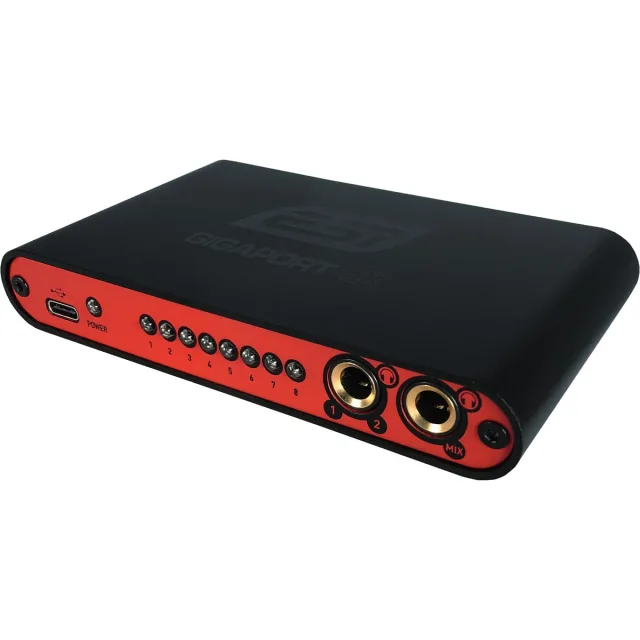
A Raspberry Pi coordinates a motorized platter, touchscreen, keys, encoder, fader and audio interface inside a custom enclosure. The interface outputs audio from the Raspberry Pi DJ software; it does not run the application itself.
A good fit for
Multichannel audio output. 62 BAR: a miniature DJ instrument.
Not the right fit for
A guaranteed plug-and-play recreation without the listed hardware revisions, accessories and software setup.
Compatibility
- Exact hardware
- ESI GIGAPORT eX
- Software route
- USB multichannel audio from Raspberry Pi
- Where code runs
- The interface outputs audio from the Raspberry Pi DJ software; it does not run the application itself.
- Development tools
- A laptop, a coding agent such as Claude Code or Cursor, and the tools listed in the guide.
- Evidence
- Source-reviewed creator project. Not hands-on tested.
Project ideas
- 0162 BAR: a miniature DJ instrument
Getting started
- 01
Check your model and revision
Do not substitute GIGAPORT HD+. Confirm delivery region; Linux operation is attributed to the creator, not the retailer’s Windows/macOS software claims. This is one component of the DJ build, not the complete console. Controls, screen and motorized hardware are separate.
- 02
Read the creator’s setup
Creator says physical prototype assembled after the linked animation. Motor feel and mechanical fit remain under development; not a finished retail product. The source image is an assembly visualization, not a photograph of the later assembled prototype.
- 03
Start with a reversible test
Follow the linked project source before changing the device. Back up existing configuration, keep credentials private and stop if your hardware differs from the documented version.
Setup & technical references
Starter prompt
Help me plan 62 bar: a miniature dj instrument using ESI GIGAPORT eX. Read https://youcanjustbuildthings.openai.chatgpt.site/projects/submission-61f7edd92afacdf02d4f2ce9775bc6754d592451748cb2476cbd6725c03624b0 and its supporting sources first. The interface outputs audio from the Raspberry Pi DJ software; it does not run the application itself. Creator says physical prototype assembled after the linked animation. Motor feel and mechanical fit remain under development; not a finished retail product. The source image is an assembly visualization, not a photograph of the later assembled prototype. Confirm my exact hardware and required accessories, explain what is missing, and propose one reversible test. Ask before flashing firmware, changing privileged system settings or moving physical hardware.
Confirm your exact hardware before running device-changing commands.
Common questions
Where does my software run?
The interface outputs audio from the Raspberry Pi DJ software; it does not run the application itself.
What should I check before buying?
Exact GIGAPORT eX; French retailer. Do not substitute GIGAPORT HD+. Confirm delivery region; Linux operation is attributed to the creator, not the retailer’s Windows/macOS software claims. This is one component of the DJ build, not the complete console. Controls, screen and motorized hardware are separate. Stock and delivery region are not confirmed. Check exact model and bundle contents with the seller.
What are the setup risks?
Creator says physical prototype assembled after the linked animation. Motor feel and mechanical fit remain under development; not a finished retail product. The source image is an assembly visualization, not a photograph of the later assembled prototype.