Why customize RICOH GR IV?
Version-specific camera scripts replace the stock shutdown image on a Ricoh GR IV with a personalized picture. Shutdown-screen modifications act on camera firmware; a separate StickS3 project provides Wi-Fi live view and shutter control. Related projects show: A tiny viewfinder for your Ricoh GR; Change a Ricoh GR IV's shutdown screen.
A good fit for
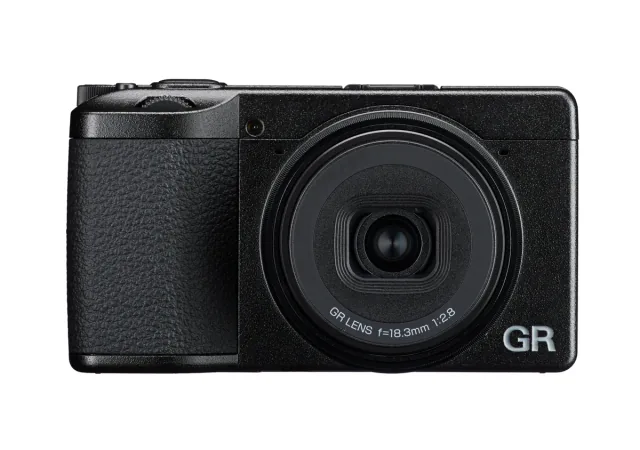
Camera being modified. Change a Ricoh GR IV's shutdown screen.
Not the right fit for
A guaranteed plug-and-play recreation without the listed hardware revisions, accessories and software setup.
Compatibility
- Exact hardware
- RICOH GR IV
- Software route
- Version-specific camera scripts / Wi-Fi remote
- Where code runs
- Shutdown-screen modifications act on camera firmware; a separate StickS3 project provides Wi-Fi live view and shutter control.
- Development tools
- A laptop, a coding agent such as Claude Code or Cursor, and the tools listed in the guide.
- Evidence
- Source-reviewed creator project. Not hands-on tested.
Project ideas
- 01A tiny viewfinder for your Ricoh GR
- 02Change a Ricoh GR IV's shutdown screen
Getting started
- 01
Check your model and revision
Match camera and firmware; other GR bodies and firmware versions are separate targets.
- 02
Read the creator’s setup
Model/firmware-specific modification requires verified backups and recovery planning. Distinct from the StickS3 remote-viewfinder project.
- 03
Start with a reversible test
Follow the linked project source before changing the device. Back up existing configuration, keep credentials private and stop if your hardware differs from the documented version.
Setup & technical references
A tiny viewfinder for your Ricoh GR
A tiny viewfinder for your Ricoh GR — supporting source
Change a Ricoh GR IV's shutdown screen
Change a Ricoh GR IV's shutdown screen — supporting source
RICOH GR IV — Exact product; firmware must be checked separately
Starter prompt
Help me plan change a ricoh gr iv's shutdown screen using RICOH GR IV. Read https://youcanjustbuildthings.openai.chatgpt.site/projects/submission-8f79d3b2973c34d916db32d50143ead2ab5a86eb8641dcfe1cb72df8c6496467 and its supporting sources first. Shutdown-screen modifications act on camera firmware; a separate StickS3 project provides Wi-Fi live view and shutter control. Model/firmware-specific modification requires verified backups and recovery planning. Distinct from the StickS3 remote-viewfinder project. Confirm my exact hardware and required accessories, explain what is missing, and propose one reversible test. Ask before flashing firmware, changing privileged system settings or moving physical hardware.
Confirm your exact hardware before running device-changing commands.
Common questions
Where does my software run?
Shutdown-screen modifications act on camera firmware; a separate StickS3 project provides Wi-Fi live view and shutter control.
What should I check before buying?
Exact product; firmware must be checked separately. Match camera and firmware; other GR bodies and firmware versions are separate targets. Stock and delivery region are not confirmed. Check exact model and bundle contents with the seller.
What are the setup risks?
Model/firmware-specific modification requires verified backups and recovery planning. Distinct from the StickS3 remote-viewfinder project.