About the directory & our standards

Displays / Kit / assembly

Send a photo to a sleeping e-paper frame

An e-paper frame receives photos remotely and sleeps between updates.

Read the original build See shopping list
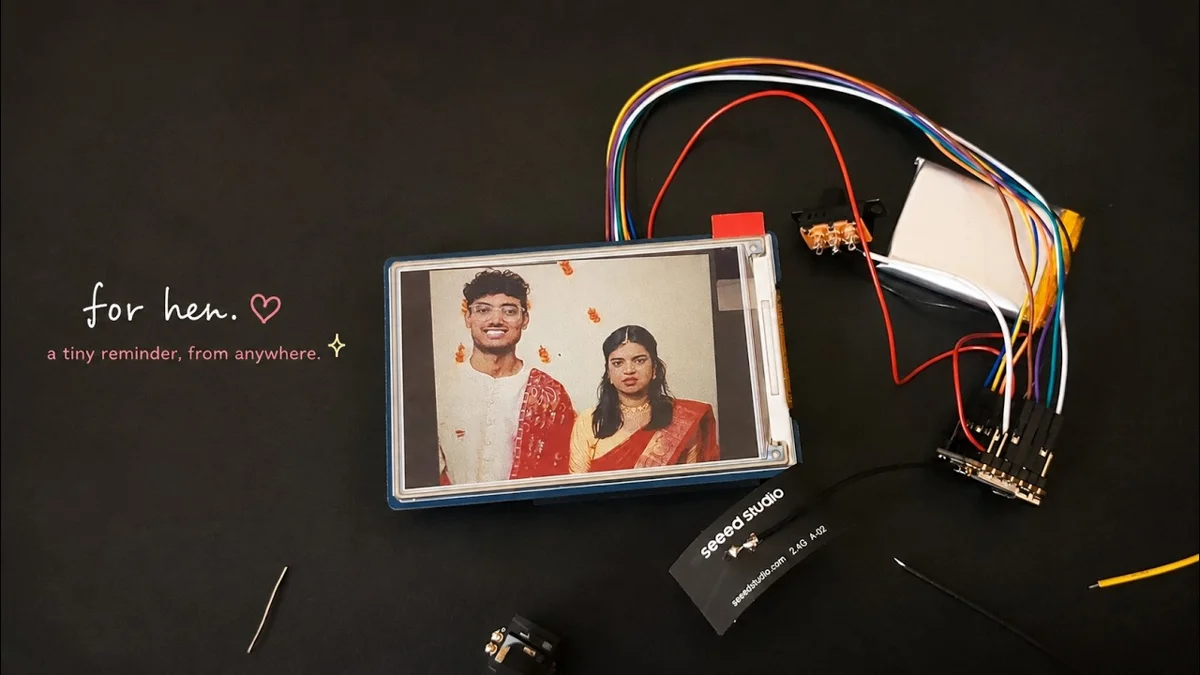
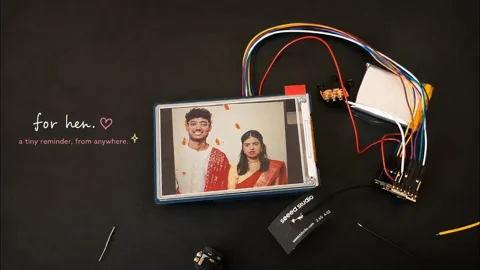
Send a photo to a sleeping e-paper frame — build photo from the creator’s source
tarat_211 · build photo

What the hardware does

A XIAO ESP32S3 Sense fetches an image over Wi-Fi, updates a six-colour e-paper display and sleeps between refreshes while the picture stays visible.

How the agent helped

The creator says Codex helped build the Android sending app, Python image server and frame software that retrieves photos over Wi-Fi.

Before you build

Requires assembly/soldering, an Android app, Python server and firmware. The dedicated camera and frame are separate endpoints; phone-photo use can omit the camera board. The repository warns that original and processed image URLs are public: use test images on a trusted network until access control is added. Camera capture-button and offline-queue work is not complete.

Follow the build

youcanjustbuildthings.openai.chatgpt.site

Original build story

Creator showcase

github.com
Supporting source

Shopping list

Save as Markdown

Two endpoints for the dedicated-camera version; one receiver for phone-photo use. The README says original/processed image URLs are public: use test images on a trusted network until access control is added. Camera capture button and offline queue are future work.

Confirm before buying

  • The receiver GPIO map and dedicated-camera firmware have been recovered. Confirm the actual e-paper driver-board connector and power pin before wiring; panel-only glass is not sufficient.
  • Receiver-board/camera revision, complete enclosure dimensions, fastener counts and endpoint power supplies are still not specified enough for a verified one-click kit.

Quantities are for one build. Unless marked source-specified, they are planning quantities; confirm kit contents and the chosen configuration before ordering.

  1. Qty. 1Plan / confirm
    Required

    Seeed Studio XIAO ESP32S3 receiver

    Drive the remote frame.

    Receiver firmware targets XIAO pins. Showcase names the Sense family but does not establish whether the receiver itself has a camera daughterboard.

    Sources & quantity basis

    Creator source. Planning quantity for one build; check the selected configuration.

    View product

    Exact product

  2. Qty. 1Plan / confirm
    Required

    Waveshare 3.6-inch six-colour e-paper, EPD_3in6e

    600×400 frame display.

    Choose panel plus compatible driver board, not only bare glass. Current product listing is a specification match, not proof of the creator’s purchased bundle.

    Sources & quantity basis

    Creator source. Planning quantity for one build; check the selected configuration.

    View product

    Specification match; choose display plus driver

  3. Qty. 1Plan / confirm
    Conditional

    Seeed Studio XIAO ESP32S3 Sense camera unit

    Dedicated photo-capture sender.

    A SECOND board only for the dedicated-camera route. The separate working camera/audio firmware snapshot is available under taruns_module; it must have the Sense camera attached. The bare-board recovery record reports 8MB flash and 8MB PSRAM; choose the matching variant and camera revision.

    Sources & quantity basis

    Creator source. Planning quantity for one build; check the selected configuration.

    View product

    Exact product family; camera revisions vary

  4. Qty. 1Plan / confirm
    Required

    Android phone

    Choose and send photos.

    Sources & quantity basis

    Creator source. Planning quantity for one build; check the selected configuration.

    No exact purchase link verified; confirm the model and requirements above before ordering.

  5. Qty. 1Plan / confirm
    Required

    Python server host

    Build, configure or flash the software.

    Run FastAPI and image conversion.

    Sources & quantity basis

    Setup requirement — check against your configuration. Planning quantity for one build; check the selected configuration.

    Use existing equipment or match the specification above. No exact purchase link verified.

  6. Qty. 1Plan / confirm
    Required

    Momentary button to GND

    Receiver refresh / setup control.

    Receiver code identifies GPIO1 / XIAO D0; optional camera capture button is future work, not the same button.

    Sources & quantity basis

    Creator source. Planning quantity for one build; check the selected configuration.

    No exact purchase link verified; confirm the model and requirements above before ordering.

  7. Qty. SetPlan / confirm
    Required

    Jumper wires and soldered connections

    Connect receiver to display/driver.

    Current firmware GPIO mapping: SCK=8, MOSI=7, CS=9, DC=3, RST=2, BUSY=4 and PWR=5 when D_9PIN is enabled. Use GPIO numbers and verify the actual driver connector against its pinout; code comments label XIAO D pins separately. Also connect the correct supply and common ground. This is a source map, not a tested wiring tutorial.

    Sources & quantity basis

    Creator source. Planning quantity for one build; check the selected configuration.

    No exact purchase link verified; confirm the model and requirements above before ordering.

  8. Qty. 1 per powered boardPlan / confirm
    Required

    USB-C data cable

    Connect to the computer for programming or data.

    A charge-only cable cannot flash firmware. Example requires a USB-A host port. If your computer has only USB-C, use an appropriate USB-C data cable instead. Reuse the device’s included cable where possible; this is not a standalone power-supply recommendation.

    Sources & quantity basis

    Setup requirement — check against your configuration. Planning quantity for one build; check the selected configuration.

    Example part

    Accessory example: USB-A to USB-C, 1 m, data capable

  9. Qty. 1Plan / confirm
    Required

    USB power sources

    Power the device.

    Separate endpoints need their own suitable USB power; no battery design is supplied.

    Sources & quantity basis

    Setup requirement — check against your configuration. Planning quantity for one build; check the selected configuration.

    Use existing equipment or match the specification above. No exact purchase link verified.

  10. Qty. 1 setPlan / confirm
    Required

    Frame / enclosure

    House the receiver and panel.

    Creator made a custom desk enclosure; dimensions and fastener BOM are incomplete.

    Sources & quantity basis

    Creator source. Planning quantity for one build; check the selected configuration.

    No exact purchase link verified; confirm the model and requirements above before ordering.

  11. Qty. SetPlan / confirm
    Tool

    Assembly and test tools

    Assemble and check the circuit.

    Soldering iron, solder, wire cutters and multimeter; review the wiring before power-up.

    Sources & quantity basis

    Setup requirement — check against your configuration. Planning quantity for one build; check the selected configuration.

    Use existing equipment or match the specification above. No exact purchase link verified.

Source reviewed, not assembled or hands-on tested. A working product page does not confirm stock, firmware compatibility or a complete build.

Built something with a coding agent?

Share your hardware project so others can try it.

Submit a project